
Post-quantum cryptography and Cloudflare Application Services
Why Post-Quantum Cryptography is a Priority
In the world of systems engineering, we often prioritize immediate threats—zero-days, DDoS mitigation, or configuration drifts. However, a silent vulnerability is currently scaling in the background of every encrypted packet sent over the internet.
Post-Quantum Cryptography (PQC) is no longer a theoretical "future" problem. It is a present-day data integrity requirement. Here is why system engineers and technologists need to bake PQC into their roadmaps today.
The "Harvest Now, Decrypt Later" (HNDL) Paradigm
The most common misconception about quantum computing is that the threat only begins once a cryptographically relevant quantum computer (CRQC) is built. This is false.
Adversaries are currently practicing HNDL (Harvest Now, Decrypt Later). They are intercepting and storing massive amounts of encrypted traffic today, waiting for the "Q-Day"—the moment a quantum computer becomes powerful enough to break standard encryption.
What is at Risk?
Data transmitted today with 10+ years of required confidentiality is already vulnerable. This includes:
- Healthcare Records: HIPAA-protected data remains sensitive for the life of the patient.
- Financial & Intellectual Property: M&A strategies, trade secrets, and long-term investment data.
- Government/Defense: Classified communications with multi-decade sensitivity.
Why Traditional Encryption Fails
Our current security infrastructure relies on "Classical Cryptography"—specifically, mathematical problems that are computationally infeasible for classical hardware to solve.
- Integer Factoring (RSA)
- Discrete Logarithms (Diffie-Hellman, Elliptic Curves)
A classical supercomputer would take thousands of years to crack a strong RSA key. However, Shor’s Algorithm (proven in 1994) allows a sufficiently powerful quantum computer to solve these problems in hours or days.
While we are likely 5–15 years away from a stable CRQC, the timeline for transitioning infrastructure is equally long. Waiting for Q-Day to migrate is a guarantee of total data exposure.
The Technical Solution: The Hybrid Approach
The industry is moving toward Hybrid Key Agreement, specifically the X25519MLKEM768 construction. This method combines classical and post-quantum algorithms into a single handshake:

Why Hybrid?
- Failsafe Security: If the new PQC algorithm is found to have a classical vulnerability, the session is still protected by the X25519 (ECC) layer.
- Quantum Resistance: If a quantum computer attacks the session, the ML-KEM layer provides the necessary protection.
- Compliance: This approach meets NIST standards while maintaining backwards compatibility with existing security postures.
Note on Symmetric Encryption: Unlike RSA/ECC, AES-256 is considered "quantum-safe." While Grover’s Algorithm can speed up attacks on symmetric keys, doubling the key size (to 256-bit) effectively mitigates the threat.
The Business Case for Early Adoption
For system engineers, pitching PQC to stakeholders involves more than just "scary math." It’s about risk management and operational efficiency.
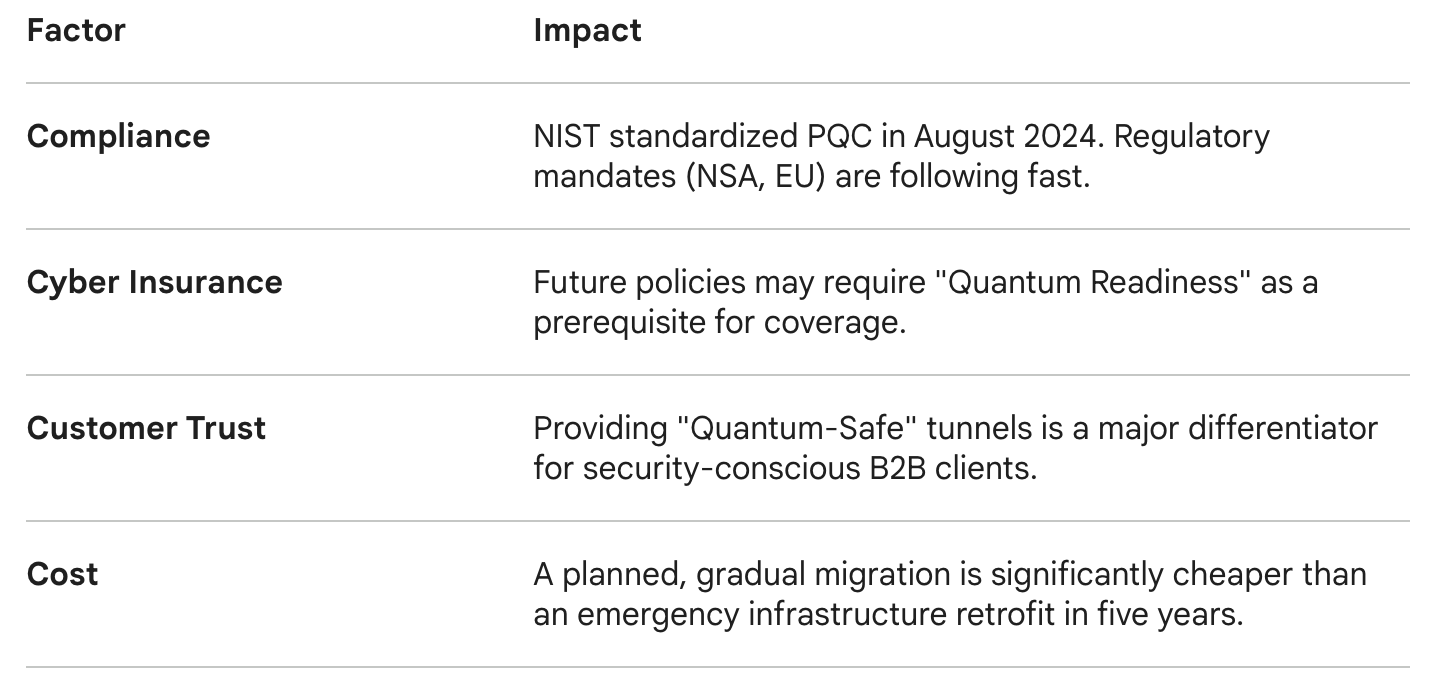
Bottom Line
The clock didn't start with the birth of the first quantum computer; it started the moment we began transmitting sensitive data over the public internet.
Post-Quantum Cryptography is the only way to ensure that the "secure" communications of today don't become the public records of tomorrow. If you are managing infrastructure, the time to audit your origin support for PQC is now.
Overview: Three Connection Points and how Cloudflare Can Help
When a request flows through Cloudflare, there are three distinct connection segments:
- Visitor → Cloudflare (already PQC-enabled by default)
- Cloudflare internal services (already PQC-enabled)
- Cloudflare → Origin Server (requires customer action)
The third connection is where customers need to prepare their infrastructure.
Step 1: Understand Current PQC Status
What's Already Working:
- ✅ Visitor to Cloudflare: Since October 2022, all Cloudflare sites using TLS 1.3 automatically support PQC hybrid key agreement (X25519MLKEM768)
- ✅ Cloudflare Internal: Since September 2023, internal Cloudflare connections use PQC
- ⚠️ Cloudflare to Origin: Requires origin server configuration
Key Algorithm:
- Cloudflare uses X25519MLKEM768 - a hybrid key agreement combining:
- X25519 (classical Elliptic Curve Diffie-Hellman)
- ML-KEM-768 (post-quantum key encapsulation mechanism)
Step 2: Origin Server Prerequisites
Before enabling PQC to your origin, ensure:
1. TLS 1.3 Support
- Origin must support TLS 1.3 protocol
- PQC is NOT supported on TLS 1.2 or earlier
2. Valid SSL/TLS Certificate
- Use Full (Strict) SSL mode (recommended)
- Certificate must be:
- Unexpired
- From a publicly trusted CA or Cloudflare Origin CA
- Have matching CN/SAN for your hostname
3. Port Configuration
- Origin must accept HTTPS connections on port 443
4. Handle Multi-Packet ClientHello
- PQC ClientHello messages are larger (typically 2 network packets)
- Ensure no middleboxes/firewalls block fragmented TLS handshakes
Step 3: Origin Server Software Compatibility
Your origin server software must support X25519MLKEM768. Compatible software includes:
Web Servers:
- NGINX: With BoringSSL or OpenSSL 3.4.0+
- Apache: With mod_ssl and compatible OpenSSL/BoringSSL
- Caddy: Default support in 2.10.0+
- Traefik: Default in 3.4.2+, 2.11.26+
TLS Libraries:
- BoringSSL: Supported
- OpenSSL: Version 3.4.0+ with oqs-provider 0.7.0+
- AWS-LC: Supported
- Rustls: Version 0.23.14+
- Botan C++: Version 3.7.0+
Step 4: Configure Origin Server
Example: NGINX Configuration
Add to your NGINX SSL configuration:
ssl_protocols TLSv1.3;
ssl_ecdh_curve X25519MLKEM768:X25519:P-256:P-384;
ssl_prefer_server_ciphers on;
Test Origin Configuration
Use BoringSSL's bssl tool to verify:
bssl client -connect your-origin-server:443 -curves X25519MLKEM768
Expected output: The ECDHE curve field should show X25519MLKEM768
Alternative: Cloudflare Tunnel
If direct origin configuration is challenging, use Cloudflare Tunnel for PQC connections between Cloudflare and your origin.
Step 5: Configure Cloudflare Zone Settings
By default, Cloudflare uses a conservative approach with PQC to origins:
- Advertises X25519MLKEM768 support
- Sends classical X25519 keyshare first
- Requires origin to request PQC via HelloRetryRequest (adds 1 round trip)
Option A: Default (Most Compatible)
No configuration needed - automatic for all zones
Option B: Preferred Mode (Best Performance)
If your origin is PQC-ready, enable "preferred" mode to skip the extra round trip:
API Request:
curl "https://api.cloudflare.com/client/v4/zones/$ZONE_ID/cache/origin_post_quantum_encryption" \

 --request PUT \

 --header "Authorization: Bearer $CLOUDFLARE_API_TOKEN" \

 --json '{

  "value": "preferred"

}'Available Values:
- supported (default): Most compatible, advertises PQC but sends classical keyshare first
- preferred: Most performant, sends PQC keyshare immediately
- off: Disable PQC to origin entirely
Required Token Permissions:
- Zone Settings Write, OR
- Zone Write
Step 6: Testing and Verification
1. Test Origin Directly
- bssl client -connect your-origin:443 -curves X25519MLKEM768
2. Test via Cloudflare Radar
- Visit: https://radar.cloudflare.com/post-quantum
- Use the host test tool to check your domain
3. Monitor Connection Logs
- Check origin server logs for successful TLS 1.3 handshakes
- Verify X25519MLKEM768 appears in negotiated cipher/curve
4. Use Cloudflare Analytics
- Monitor error rates (watch for 525 errors)
- Check if connections succeed without fallback
Step 7: Important Considerations
FIPS Mode Limitation:
- PQC is automatically disabled for zones in FIPS compliance mode
- FIPS-compliant algorithms don't include ML-KEM yet
Impact on Workers:
- The zone-level PQC setting affects all outbound connections, including fetch() requests from Workers
SSL Mode Requirements:
- Off/Flexible: PQC not applicable (no encryption to origin)
- Full: PQC supported but certificate not validated
- Full (Strict): Recommended - PQC with certificate validation
- Origin Pull: PQC supported with authenticated origin pulls
No Cloudflare Dashboard UI:
- Currently PQC to origin configuration is API-only
- Dashboard support may come in future releases
Step 8: Rollback Plan
If you encounter issues after enabling PQC:
1. Disable PQC via API:
   curl "https://api.cloudflare.com/client/v4/zones/$ZONE_ID/cache/origin_post_quantum_encryption" \

   --request PUT \

   --header "Authorization: Bearer $CLOUDFLARE_API_TOKEN" \

--json '{"value": "off"}'2. Check for Common Issues:
- Middleboxes blocking large ClientHello packets
- Origin TLS library doesn't support X25519MLKEM768
- TLS 1.3 not properly enabled
- Certificate validation failures
Summary Checklist
Customer Preparation:
- [ ] Verify origin supports TLS 1.3
- [ ] Ensure valid SSL certificate installed
- [ ] Update origin server software to PQC-compatible version
- [ ] Configure origin to prefer X25519MLKEM768
- [ ] Test origin directly with bssl tool
- [ ] Verify no middleboxes block fragmented handshakes
Cloudflare Configuration:
- [ ] Confirm SSL mode is Full or Full (Strict)
- [ ] Use API to set origin PQC preference (optional)
- [ ] Test via Cloudflare Radar tool
- [ ] Monitor error rates after enabling
On Cloudflare Side:
- ✅ Visitor→Cloudflare PQC: Already enabled (no action needed)
- ✅ Internal Cloudflare PQC: Already enabled (no action needed)
- ⚙️ Cloudflare→Origin PQC: Follows your zone configuration
Related posts


Leave a Comment
Your comment will be reviewed before appearing on the site.
Comments
Be the first to comment on this post!